
The MambaBuy rehearsal: nine scenes, one running bill, no money spent
Read it once like a script, with nothing in your basket. Each scene says what the screen shows, which control you press, what it adds to the bill and what usually trips people up.
How the script works
MambaBuy's own tutorial (help article 6664) splits an order into nine steps. We kept that order and turned each step into a scene with four cues: On screen is what you will be looking at, Your move is the button or field that matters, Tab adds is what the step costs, and If it slips is the mistake we saw most often in the help pages and notices. The screenshots are MambaBuy's own, taken from its help centre; most date from June 2025, so the menu now reads "Shipping Fee Estimation" where some images still say "Estimation".
The money side follows one invented parcel: a washed hoodie, a beanie and a canvas tote going to the UK. Only the goods prices are invented. The freight, protection and payment fee come from MambaBuy's published figures, so the total at the end is the kind of number you would really see.
The official recording above runs 1:40 and shows the older purple interface: add to cart, tick the two agreement boxes (the agent disclaimer and the banned-items list), submit. It is the quickest way to see scenes 2 to 4 moving before you read them.
Scene one: an account, a verified inbox, a coupon pack
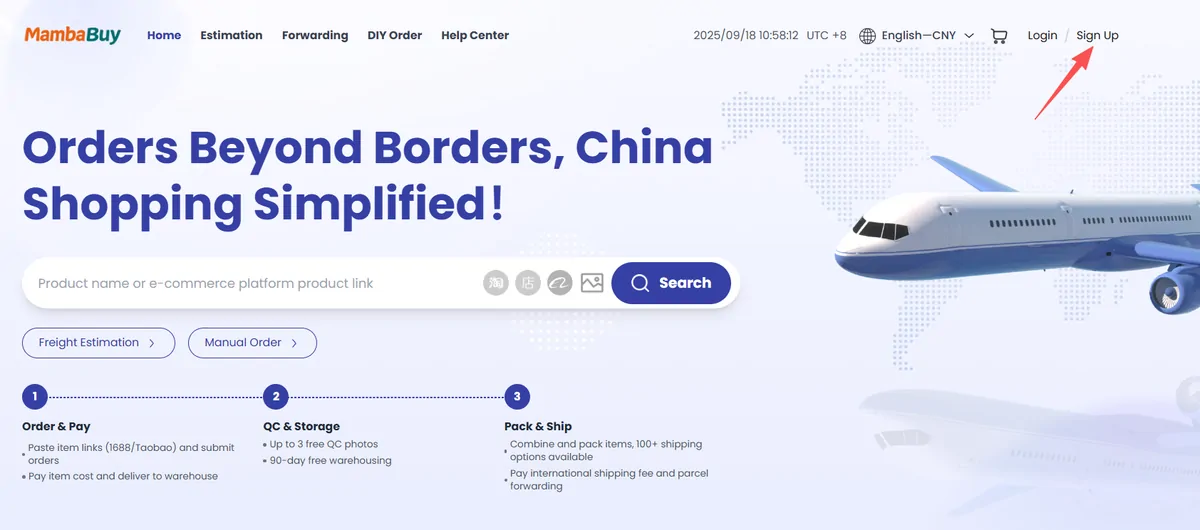
- On screen: the MambaBuy home page, with Login and Sign Up at the top right.
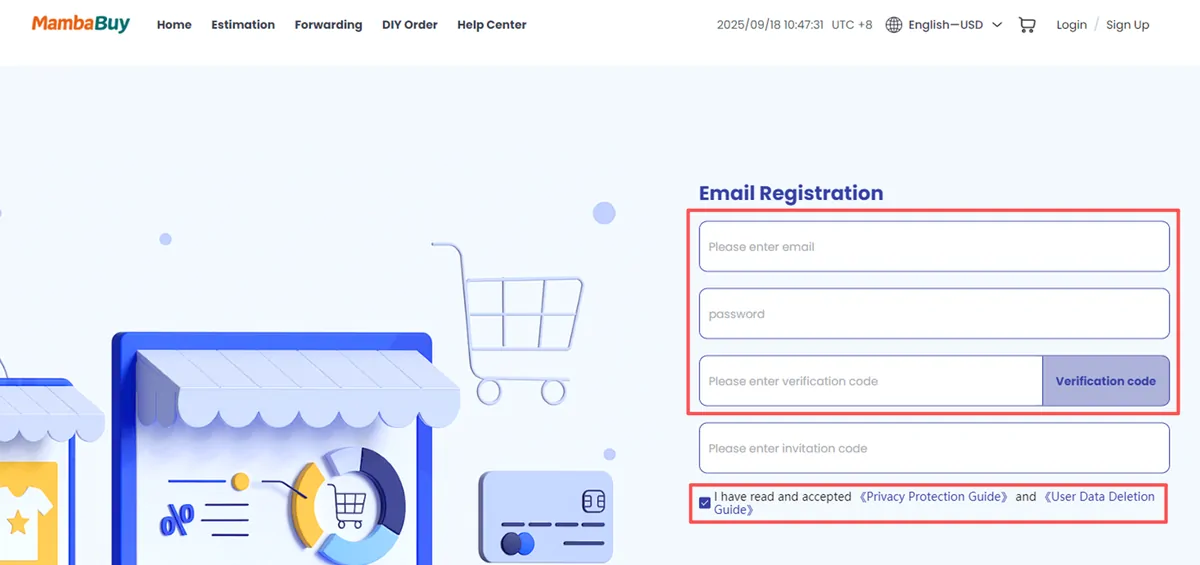
- Your move: Sign Up, then email, password and the verification code sent to that inbox.
- Tab adds: nothing. Registration is free and adds 100 reward points.
- If it slips: people skip the email check, and the welcome coupon pack only lands after it.
Four boxes make up the registration form: email, password, a code mailed to you, and an optional invitation code. We left that last box empty in the drill, because this site holds no MambaBuy referral code and does not need you to type one. The tick box at the bottom accepts the Privacy Protection Guide and the User Data Deletion Guide.
Once the address is verified, MambaBuy credits its new-user pack: 20 shipping coupons with a stated total of CNY 2,990, valid 180 days, one pack per person. Coupons work on the international shipping bill, not on goods. Our small UK parcel never reaches the CNY 299 floor of the smallest coupon, which is worth knowing before you count on it.
Running tab after scene 1: CNY 0.00, with a coupon pack and 100 points waiting.
Scene two: a copied listing address goes into MambaBuy's search bar
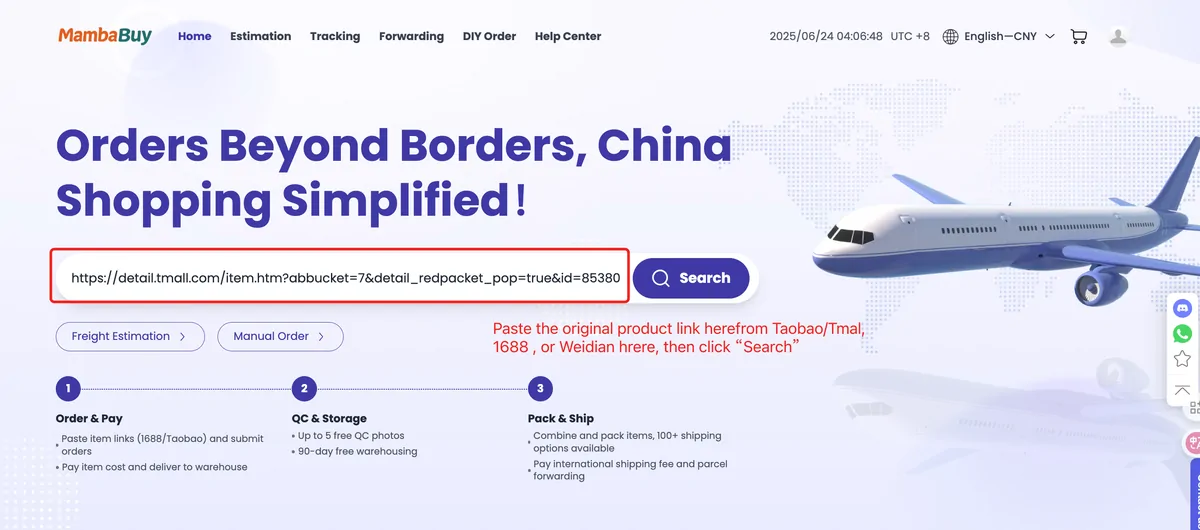
- On screen: the big search bar on the MambaBuy home page.
- Your move: paste the full Taobao, Tmall, 1688 or Weidian link and press Search; keywords and the camera icon also work.
- Tab adds: nothing yet.
- If it slips: a shortened share link from a phone app sometimes does not resolve; copy the full address instead.
This is the step that makes a shopping agent click for most people. You do not need a Chinese marketplace account: you find a listing anywhere, copy its address and hand it to MambaBuy, which reads the seller's photos, options and price into its own product page. The same bar takes plain keywords, and the camera icon runs a search by image for when you only have a photo (help article 6616).
We used the search bar for this site's own shelves. Every product card on our Spreadsheet shelves came from MambaBuy's 1688 results, and each card shows the listing number so you can paste it back in yourself.
Running tab after scene 2: still CNY 0.00.
Scene three: option menus, the disclaimer tick and Confirm Order
- On screen: the MambaBuy product page, then the Confirm Order page with a six-stage progress bar.
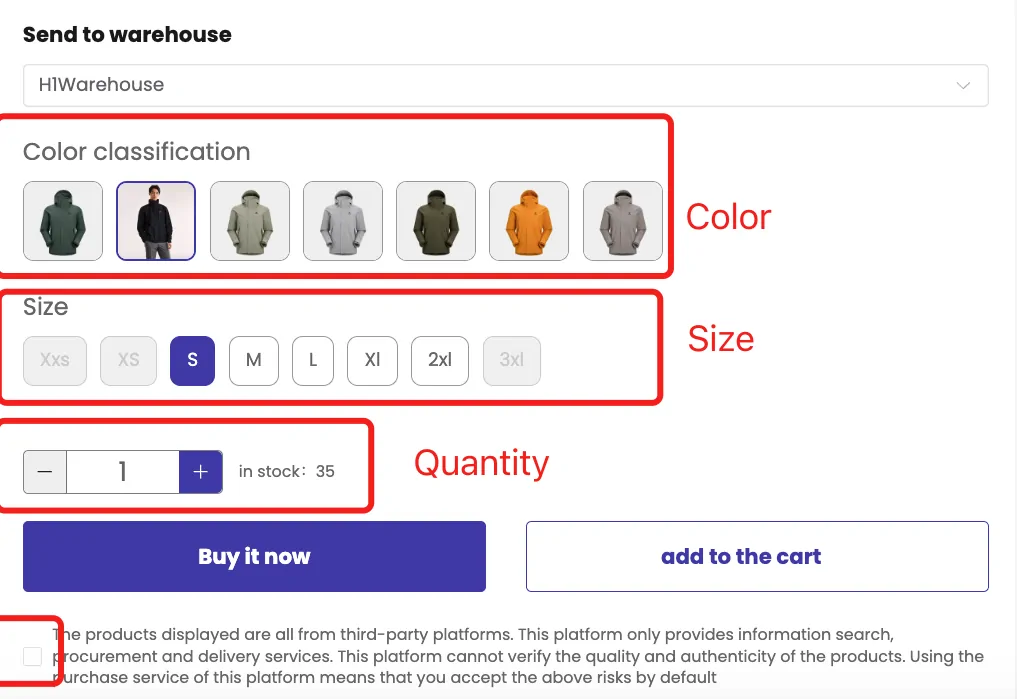
- Your move: choose options, tick the third-party disclaimer, add to cart, then submit from the cart.
- Tab adds: goods plus whatever the seller charges to post them to MambaBuy.
- If it slips: options greyed out on the product page are out of stock at the seller; they cannot be ordered.
The product page shows a two-leg route under the price: seller to warehouse, then warehouse to your address. The first leg is the seller's domestic delivery, often free inside China. In the June 2025 screenshot the warehouse is called H1Warehouse and the stock counter reads 35. Under the buttons sits a tick box saying the goods come from third-party platforms and MambaBuy cannot verify their quality or authenticity.
The Confirm Order page lists a Custom Photos column per item and an Additional Services area. In the old screenshot a "Purchase Service Fee" line is still printed in the cart total; MambaBuy's service-and-fees article says website orders carry no purchasing fee, and the example shows none charged. Additional service charges are not taken here: the page notes they are billed when the parcel is shipped.
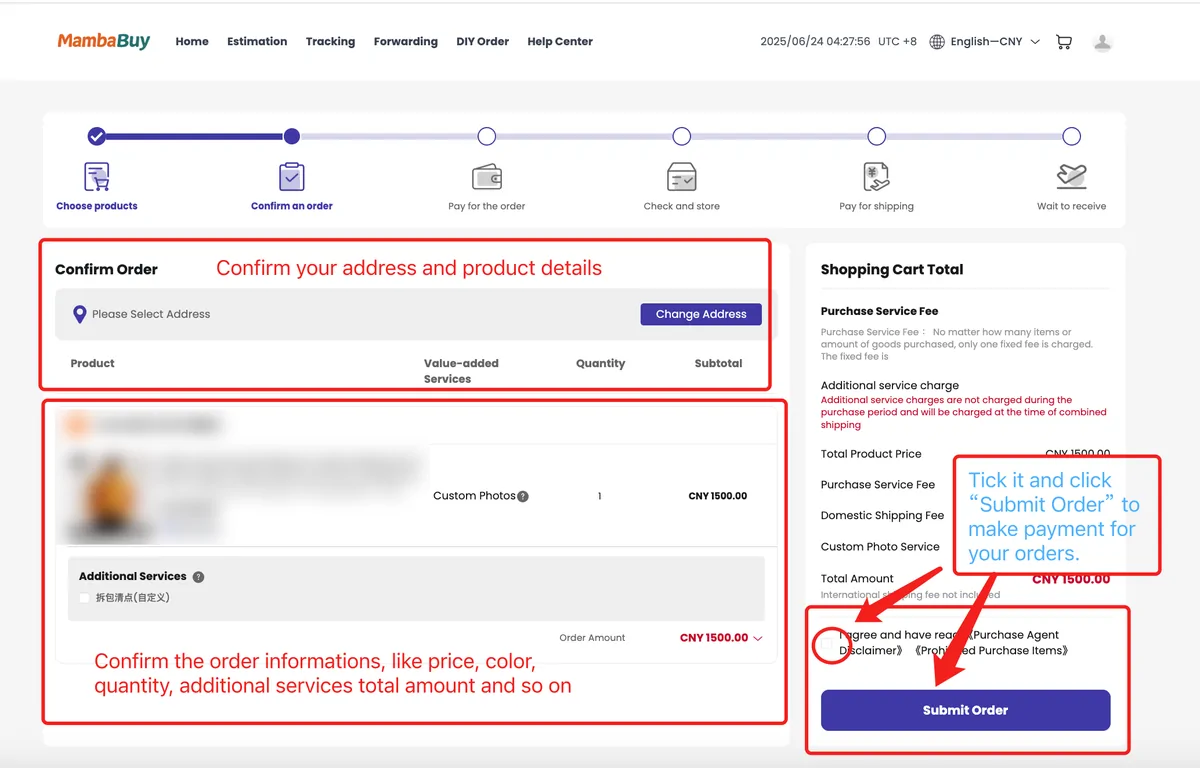
Running tab after scene 3: CNY 272.00 (goods 260 plus 12 seller delivery).
Scene four: the Checkout Counter takes the first payment
- On screen: Checkout Counter, showing Actual Payment and a list of methods.
- Your move: pick balance, PayPal or a bank transfer route, then Pay now.
- Tab adds: the payment method's own fee, if it has one.
- If it slips: bank transfers need a payment screenshot uploaded before anyone credits them.
Every MambaBuy price is in yuan, and you can settle from the wallet or directly at checkout. The June 2025 counter lists Balance Payment, PayPal and three bank transfer routes (EUR, USD and Global). Its PayPal line warns of 3.7% plus a fixed fee; the current top-up article states PayPal at 3.7% + $0.30 and cards at 5% + $0.30, while bank transfers carry no MambaBuy fee. Official pages disagree on which methods exist at all, so the Money page lays out the three versions side by side.
For the drill we paid by PayPal twice, once for goods and once for shipping, because that is how the money actually moves: the freight bill only exists after the parcel is weighed.
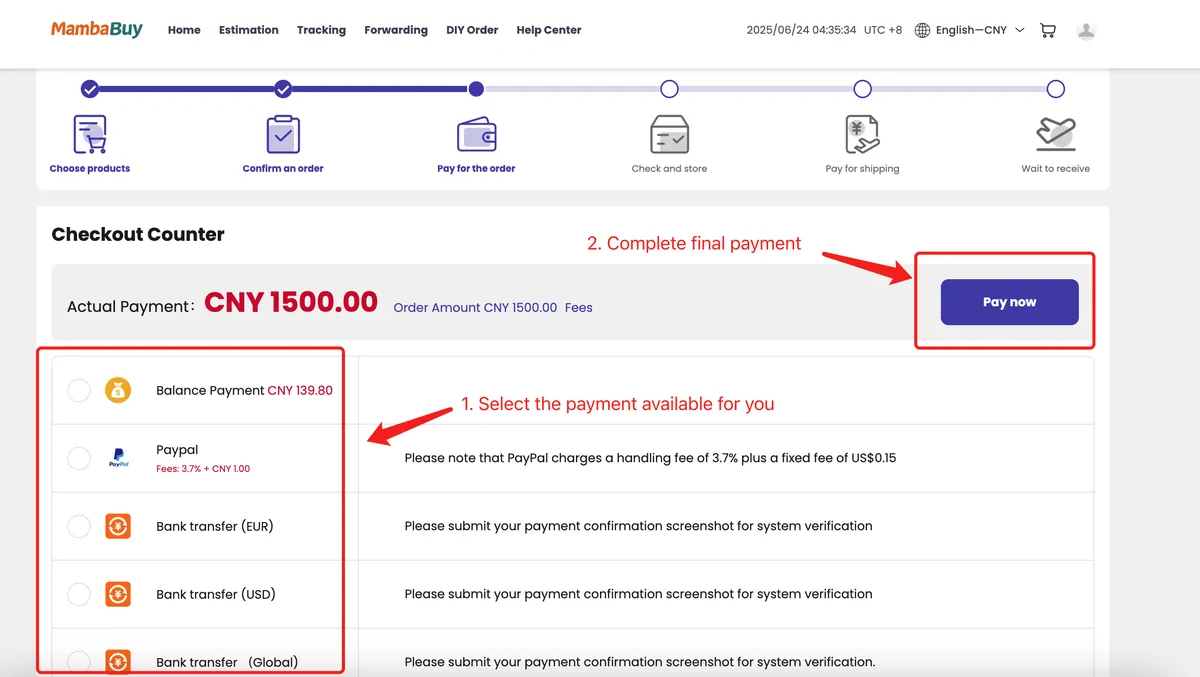
Running tab after scene 4: CNY 272.00 plus the first PayPal fee, which we carry to the end of the bill.
Scene five: offstage work by MambaBuy's purchasing team
- On screen: your order moving from Order pending to Order processing to Purchased.
- Your move: nothing, unless a message arrives about stock or a price change.
- Tab adds: nothing, unless the seller raises the price and a balance payment request appears.
- If it slips: listings show stock the seller does not have; MambaBuy checks and refunds to the wallet.
The tutorial says MambaBuy's buyers order within two business hours of payment. The status path, as a note on the warehouse screenshot spells it out, is Order pending, Order processing, Purchased, Seller sent, then stored at the warehouse. Two things can interrupt it. A seller may not have updated stock (help article 6958), in which case the item is cancelled and the money returns to your balance. Or the price changed, and you get a Repayment request under Orders, After-sales (article 7039).
Cancelling follows the status. While it reads Paid, customer service can cancel. At Purchased, before the seller ships, MambaBuy cancels and refunds the balance. Once the seller has sent it, a return depends on the seller agreeing and on who pays the freight back.
Running tab after scene 5: unchanged.
Scene six: stored, weighed and photographed
- On screen: Member Center, Warehouse, Stored, with a thumbnail and weight per package.
- Your move: open the photos the same day; the warehouse flags problems it finds within 24 hours, you flag the rest.
- Tab adds: any detailed photos you request at CNY 2 each.
- If it slips: the no-reason return window is 5 days from Stored, and it runs out quietly.
On arrival the goods are checked, weighed and photographed. MambaBuy gives three standard QC photos free (front, back and a side or logo angle) and sells detailed photos at CNY 2 each when you want a seam, a print or a measurement shot. The inspection covers style, quantity, colour, size and model; sealed goods stay sealed. Our photo checks page walks through reading those three images.
Two clocks start at Stored. The return or exchange window is 5 days (120 hours), and free storage is 90 days. In the drill we bought two detailed photos of the hoodie, one of the cuff rib and one of the print, and shipped on day 21.
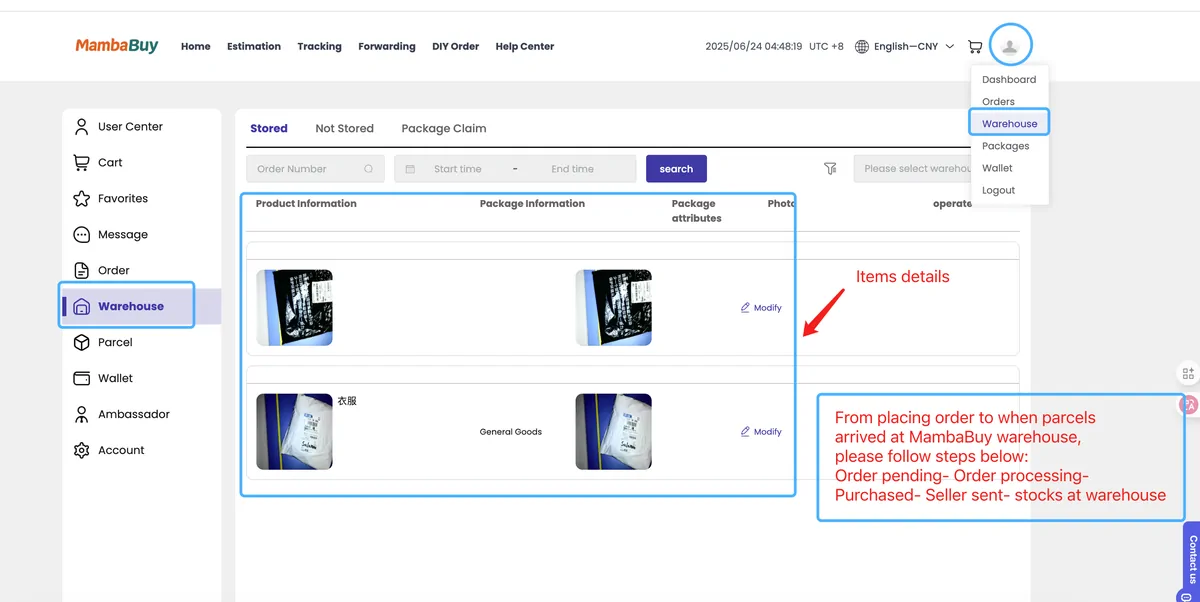
Running tab after scene 6: CNY 276.00 (detailed photos CNY 4).
Scene seven: pick the parcels, the address and a line
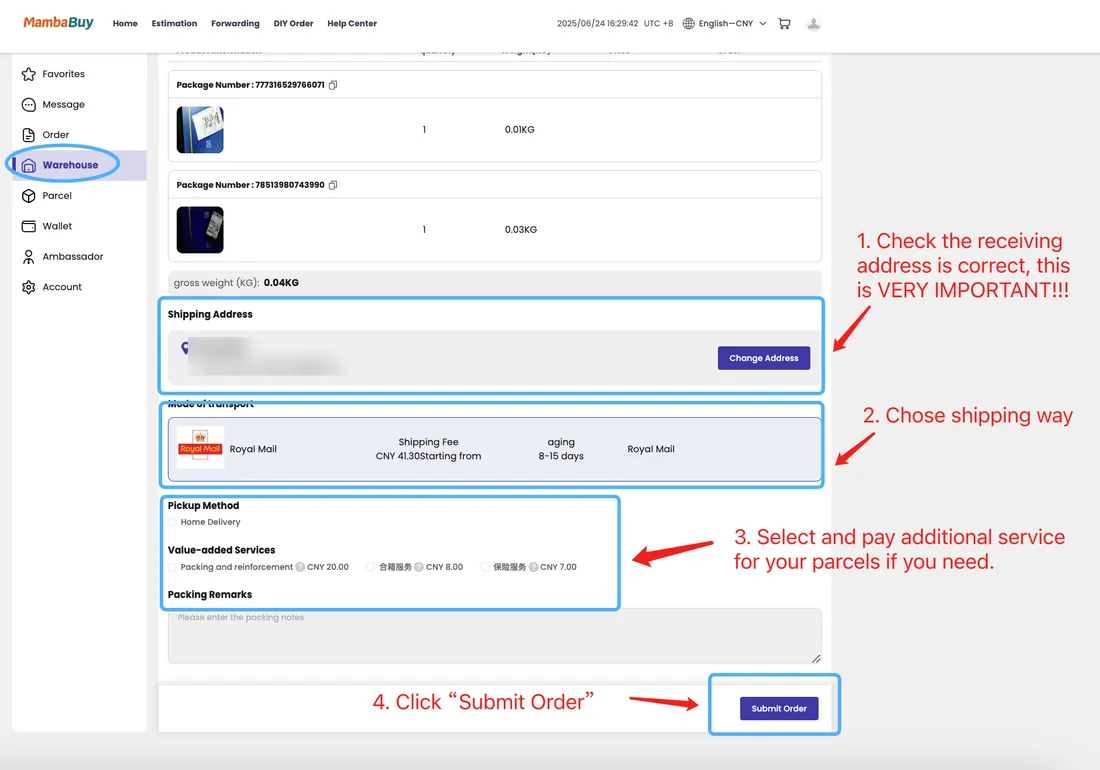
- On screen: stored packages with check boxes, then a form with address, mode of transport and value-added services.
- Your move: tick everything that should travel together, Apply for Package Consolidation, then choose the line.
- Tab adds: Shipping Protection and any packing extras you tick.
- If it slips: a wrong address; the tutorial itself shouts "VERY IMPORTANT" in red at this spot.
Each stored package shows its number, weight and remaining free storage. Tick the ones for this shipment and press Apply for Package Consolidation. The next form shows the gross weight, the address and the lines that accept your goods: MambaBuy filters out lines that cannot carry restricted items, so a battery or a scent may shorten the list.
The 2025 screenshot priced add-ons at CNY 20 for packing and reinforcement, CNY 8 for consolidation and CNY 7 for insurance. Those labels are older than the current Shipping Protection rules (CNY 35 per shipment up to CNY 3,000 of goods), so trust the live form. We ticked Basic Protection and nothing else; removing shoe boxes and packing smaller items inside luggage are free and happen on request.
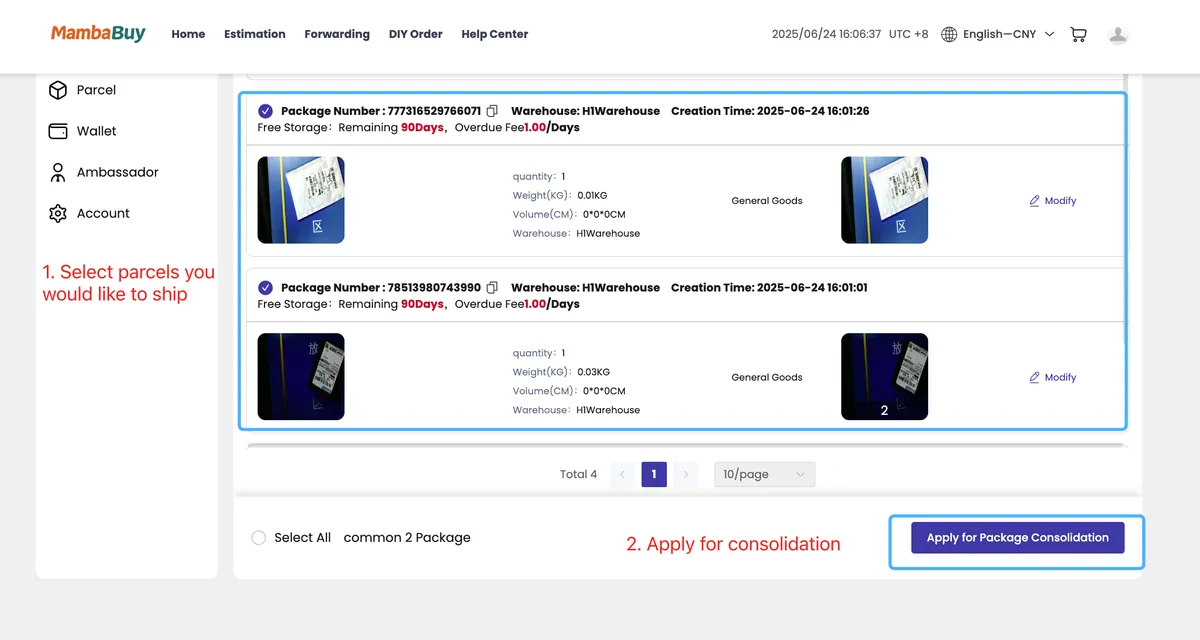
Running tab after scene 7: CNY 311.00 (Basic Shipping Protection CNY 35).
Scene eight: the warehouse packs it, then you pay the freight
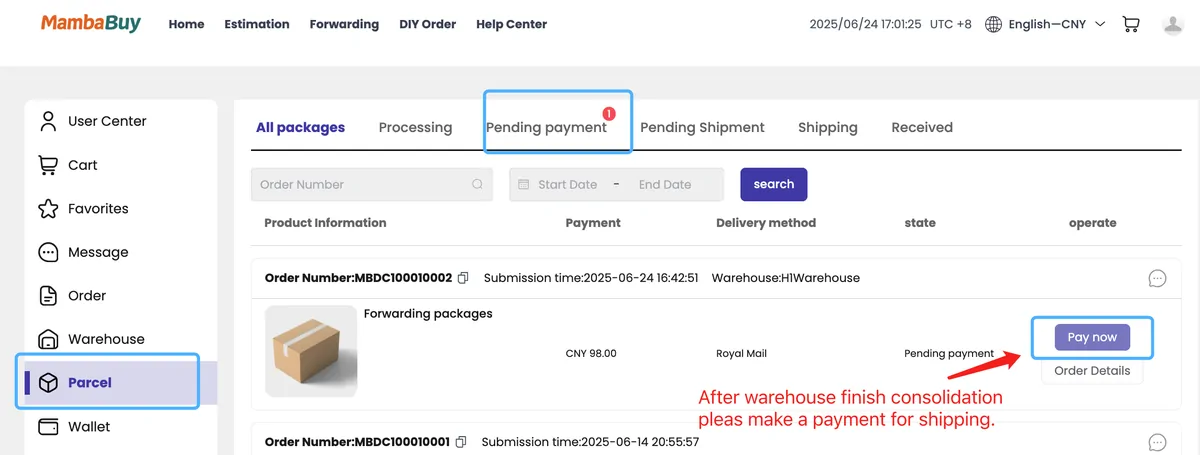
- On screen: Parcel, Pending payment, with a Pay now button beside the line name.
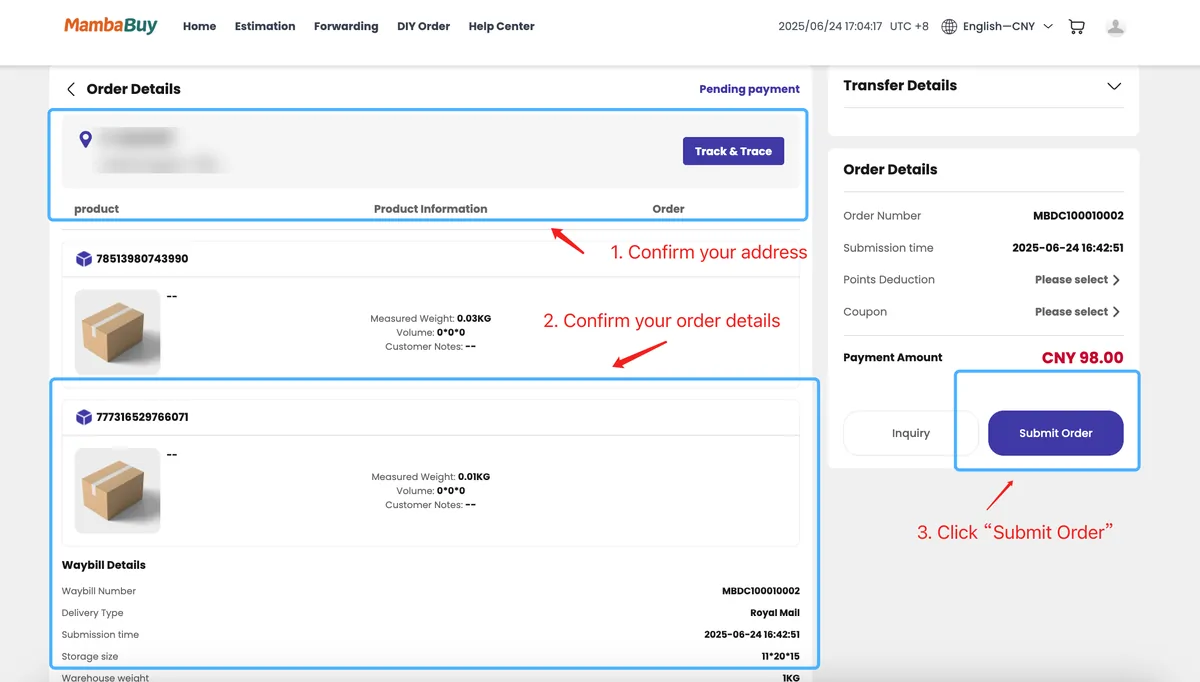
- Your move: open Order Details, apply a coupon or points if one fits, Submit Order and pay.
- Tab adds: the international freight on the billed weight, minus any coupon.
- If it slips: a late-afternoon payment, China time, or one on Saturday evening waits for the next working day.
After consolidation the parcel appears under Parcel with the status Pending payment. Order Details shows the measured weight, the box size and two selectors, Points Deduction and Coupon. Points can cover at most 10% of a parcel's settlement. Then Submit Order takes you to payment.
Our box came to 1.6 kg on the scale and measured 40 x 30 x 12 cm. Royal Mail lines divide volume by 8,000, which gives 1.8 kg, and RM01 bills in half-kilo steps, so the parcel is billed as 2.0 kg: CNY 155 on 21 October 2026. The warehouse cut-off notice says parcels settled by five in the afternoon, China time, go out that day, and Sunday is a rest day.
Running tab after scene 8: CNY 466.00 before payment fees (freight CNY 155).
Curtain call: Track & Trace, a filmed unboxing, a signature
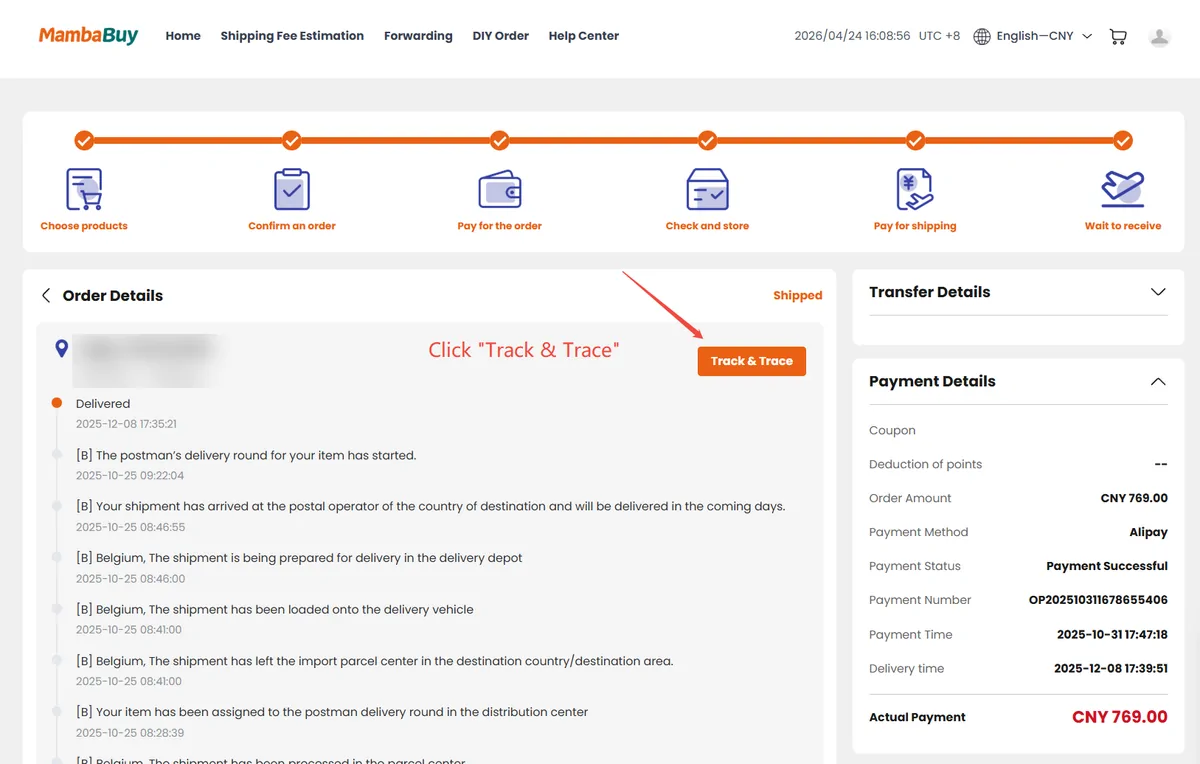
- On screen: Order Details, Track & Trace, a list of carrier events.
- Your move: film the unboxing from the sealed outer box onward.
- Tab adds: nothing more, unless customs charges you on a line that is not tax-included.
- If it slips: claims must be filed within 7 days of delivery, with an unedited unboxing video for missing items.
Tracking lives under Packages, Order Details, Track & Trace, and the help page warns that carrier updates lag. The April 2026 example below runs from Delivered back through Belgian depot scans for a German address, which is normal for these lines. Lines labelled "Tax & Duty included" have the duty handled by the line; on other routes the duty is yours.
Film the unboxing even if nothing looks wrong. MambaBuy's protection rules ask for a complete, continuous, unedited video starting from the unopened parcel before they review a partial-loss claim, and faked evidence gets an account suspended.
The rehearsal parcel, priced line by line
- Goods: a washed hoodie, a beanie and a canvas tote (sample prices)CNY 260.00
- Seller delivery to the MambaBuy warehouseCNY 12.00
- MambaBuy service fee on a website orderCNY 0.00
- Three standard QC photos per itemCNY 0.00
- Two detailed photos of the hoodie cuffs and printCNY 4.00
- Storage: shipped on day 21 of the free 90CNY 0.00
- RM01 to the UK, 1.6 kg box billed as 2.0 kgCNY 155.00
- Basic Shipping Protection (goods under CNY 3,000)CNY 35.00
- PayPal top-up fees, two paymentsCNY 20.95
- Paper total for the drillCNY 486.95
Converted at MambaBuy's 21 October 2026 display rates: about US$78.79, EUR 70.12 or GBP 59.07. The RM01 price comes from MambaBuy's line data read that day; the goods prices are made up for the drill.
Running tab after scene 9: CNY 486.95 with both PayPal fees.
After the drill: what to do for real
Run the same nine scenes with your own goods in the rehearsal calculator: it uses the same line data and fee rules as the bill above. Then read the two side scripts if they apply to you: account and wallet for top-ups, coupons and points, and DIY orders and forwarding if your goods are on JD, Pinduoduo or Xianyu, or already on their way to the warehouse.
The only scene without a picture is the fifth: MambaBuy's tutorial has no screenshot of the Purchased status, and the step happens in the background.